
MCP: connect external tools
MCP concepts, configuration, commands and diagnostics for external tools and data.
MCP, the Model Context Protocol, lets Codex use external tools and data beyond reading and editing code. Configuration lives in ~/.codex/config.toml alongside the Passion8 provider settings.
Ordinary coding does not require MCP. Add it when a task needs external documentation, databases, design files or another tool.
#What MCP means
| Concept | Meaning |
|---|---|
| MCP | Standard interface for external tools |
| MCP server | Service exposing capabilities |
| Tool | One callable operation |
| STDIO server | Service started by a local command |
| HTTP server | Remote service reached by URL |
Codex is the worker, MCP the connection, a server the toolbox and a tool one operation in it.
#Common uses
| Task | Example |
|---|---|
| API documentation | Context7 or official documentation MCP |
| Database schema | Database MCP |
| Issues and PRs | GitHub MCP |
| Design files | Figma MCP |
| Knowledge base | Notion MCP |
| Web interaction | Browser MCP |
#Add an MCP server
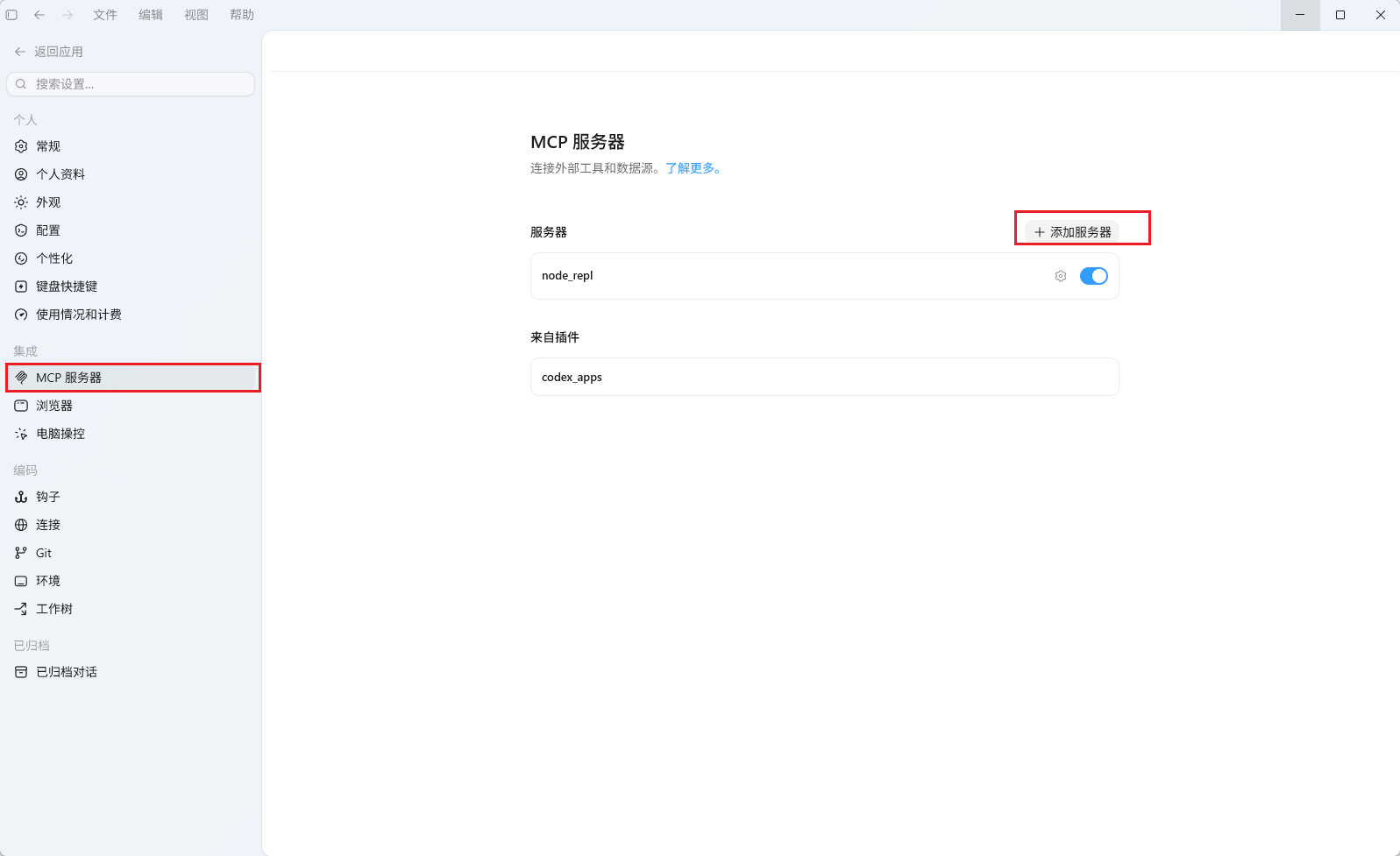
Open Settings → MCP servers and select a recommended server or add a custom server:
| Field | Purpose |
|---|---|
| Name | Your label for the service |
| Command / URL | Local startup command or remote address |
| Type | stdio or HTTP |
| Environment | Required variables such as credentials |
| Enabled tools | Operations exposed to the agent |
Then describe the task naturally, or explicitly ask it to use the selected tool, such as Context7 for current Next.js documentation.
Run the setup command from your project:
# Add Context7.
codex mcp add context7 -- npx -y @upstash/context7-mcp

# Inspect configured services.
codex mcp list
Inside a Codex session:
/mcpThis shows the currently available servers and tools.
#Command reference
| Command | Purpose |
|---|---|
| codex mcp list | List configured servers |
| codex mcp add NAME -- COMMAND | Add a STDIO server |
| codex mcp remove NAME | Remove a server |
| codex mcp get NAME | Inspect server details |
| codex mcp login NAME | Authorize a remote server that requires OAuth |
| codex mcp logout NAME | Clear that remote authorization |
MCP server authorization is separate from Passion8 model authentication.
#config.toml example
Add this alongside the provider configuration:
# Other model and provider settings remain above/beside this table.
[mcp_servers.context7]
command = "npx"
args = ["-y", "@upstash/context7-mcp"]
If unfamiliar with TOML, use the add/list/remove commands to avoid syntax mistakes.
#Missing tools: diagnostic order
- Use codex mcp list to confirm the server exists.
- Check command dependencies such as Node.js and npx.
- Authorize remote servers with codex mcp login only when they require that authentication method.
- Restart the CLI and inspect /mcp again.
Start with a documentation service before adding remote tools with broader account access.
#Continue reading
Support
Need help?
For setup, billing, or model issues, email us. Check the status page for uptime.
WeChat / QQ support is available at the bottom right.

