
Memory and AGENTS.md
Persist project rules and personal preferences without repeating context.
Do not assume every new session remembers previous conversations. Put durable instructions in AGENTS.md so Codex can load the relevant rules. Optional memory features are separate from this explicit project instruction mechanism.
#README.md, AGENTS.md and .gitignore
These files serve different readers:
| File | Reader | Purpose |
|---|---|---|
| README.md | People | What the project does and how to install/use it |
| AGENTS.md | Codex / agents | How to work in this project |
| .gitignore | Git | Which files ordinary tracking should ignore |
#Where to place AGENTS.md
Instructions can be layered:
| Location | Scope |
|---|---|
| Project-root AGENTS.md | Shared project-wide rules |
| Subdirectory, such as src/AGENTS.md | Rules for that module and its descendants |
| ~/.codex/AGENTS.md | Personal preferences across projects |
User and project instructions are combined; more specific applicable rules can refine broader guidance.
#Write an instruction file
Ask Codex to inspect the repository and prepare a draft:
codex "Read this project and draft AGENTS.md covering the stack, commands, directories and coding conventions"Review the result, remove filler and add the constraints that actually matter.
#Frontend example
Adapt this complete example to your repository:
# Project instructions

Frontend web application.

## Stack
- React + Vite + TypeScript
- Tailwind CSS
- Do not add Bootstrap or another CSS framework.

## Commands
- Install: npm install
- Develop: npm run dev
- Build: npm run build

## Structure
- src/: application source
- src/components/: shared components
- src/pages/: pages
- src/assets/: bundled assets
- public/: assets copied without bundling

## Code conventions
- Prefer React function components.
- Prefer Tailwind utilities over inline styles.
- Keep Chinese interface copy natural and concise.
- Avoid unrelated broad refactors.

## UI rules
- Maintain clear information hierarchy.
- Use consistent spacing for buttons, cards and headings.
- Preserve mobile usability.
- Avoid excessive gradients and shadows; follow the product's style.

## Boundaries
- Do not change .env or .env.local.
- Do not expose keys, tokens or passwords in output.
- Preserve existing core features.
- Do not add large dependencies without a task need.
- Do not edit unrelated files.

## On completion
1. List changed files.
2. Explain what changed and why.
3. State build/check results and whether a rebuild is needed.
4. Ask the owner to review the diff where appropriate.#Characteristics of useful instructions
| Characteristic | Meaning |
|---|---|
| Specific | Name the actual stack, commands and directories |
| Concise | Remove repetition and filler |
| Actionable | Rules can be followed without ambiguity |
| Bounded | Identify protected files and dependency constraints |
| Verifiable | Name relevant test/build/lint checks |
| Clear completion | Define the expected final report |
| Maintained | Update after stack or project changes |
#Global instructions
Use ~/.codex/AGENTS.md for preferences that should apply to all projects. Project-specific rules belong in the repository.
Desktop personalization settings can also supply reusable instructions; inspect the current client's controls and scope rather than assuming every setting writes the same file.
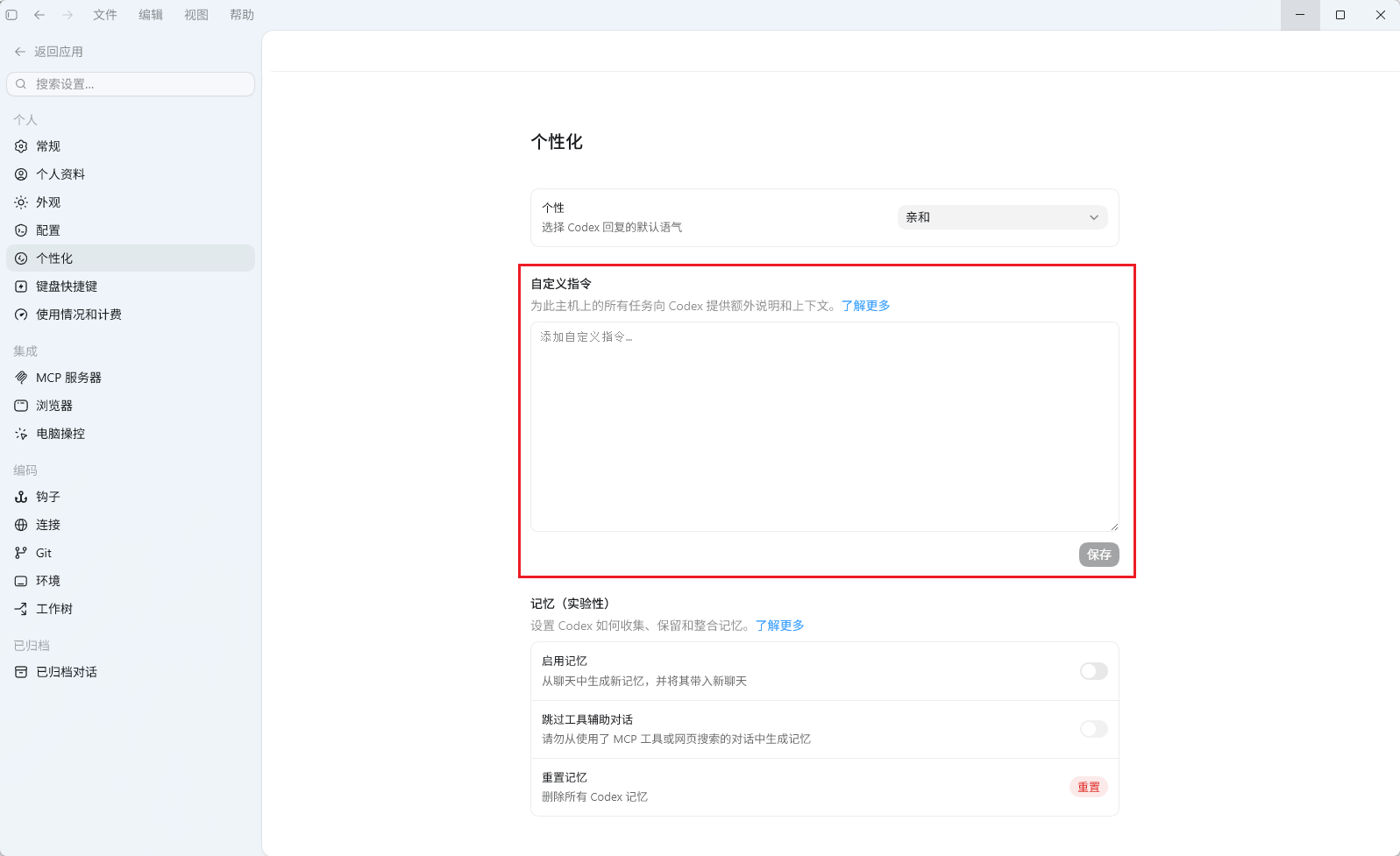
Global instructions affect multiple projects. Keep them broadly applicable and avoid mixing in one project's rules.
Example: prevent broad file deletion
Do not delete files or directories in bulk.
Do not use recursive deletion commands such as rm -rf, Remove-Item -Recurse,
rd /s or rmdir /s.
When deletion is required, identify and remove one explicit file at a time.
If a task needs bulk deletion, stop and ask the user to handle that step.
Such an instruction can express a personal boundary across projects. It complements execution permissions rather than replacing them.
Support
Need help?
For setup, billing, or model issues, email us. Check the status page for uptime.
WeChat / QQ support is available at the bottom right.

