
Code management: Git and GitHub
Git and GitHub concepts, reviewable development and isolated worktree experiments.
Git records local changes, GitHub hosts collaboration, and Codex performs coding tasks. Together they support review, rollback, isolated experiments and pull requests.
#Git versus GitHub
| Dimension | Git | GitHub |
|---|---|---|
| Purpose | Local version control | Hosted repositories and collaboration |
| Location | Your computer | Browser/cloud service |
| Operations | commit, branch, diff, merge | repositories, issues, PRs, Actions |
| Network | Not needed for local operations | Required for remote service operations |
| With Codex | Inspect and save generated changes | Collaborate and use connected cloud workflows |
#Essential Git concepts
| Concept | Meaning |
|---|---|
| Repository | Project and version history |
| Commit | A saved change with a message |
| Branch | An independent line of development |
| Diff | Comparison of changed lines |
| Stage | Select changes for the next commit |
| Merge | Combine changes from branches |
| Conflict | Overlapping changes that require resolution |
| Push | Send commits to a remote |
| Pull | Fetch and integrate remote changes |
| Clone | Create a local checkout of a remote repository |
#Essential GitHub concepts
| Concept | Meaning |
|---|---|
| Repository | Hosted Git project |
| Issue | A recorded problem or request |
| Pull request | A proposed merge for review |
| Main branch | The shared stable development line |
| Feature branch | A branch for a specific change |
| Review | Inspection before merging |
| Actions | Automated tests, builds and other workflows |
| README | Project documentation |
| .gitignore | Files excluded from ordinary tracking |
#Why Codex work benefits from Git
A task can change many files. Git provides:
- Review: see exactly what changed with git diff.
- Recovery: return to a known-good version.
- Milestones: save coherent steps as commits.
- Isolation: experiment on branches or worktrees.
- Collaboration: use push, PR, review and merge.
A saved baseline makes larger changes easier to inspect and recover. Version control is not a substitute for reviewing destructive commands, but it gives you a concrete history.
#A standard Git workflow with Codex
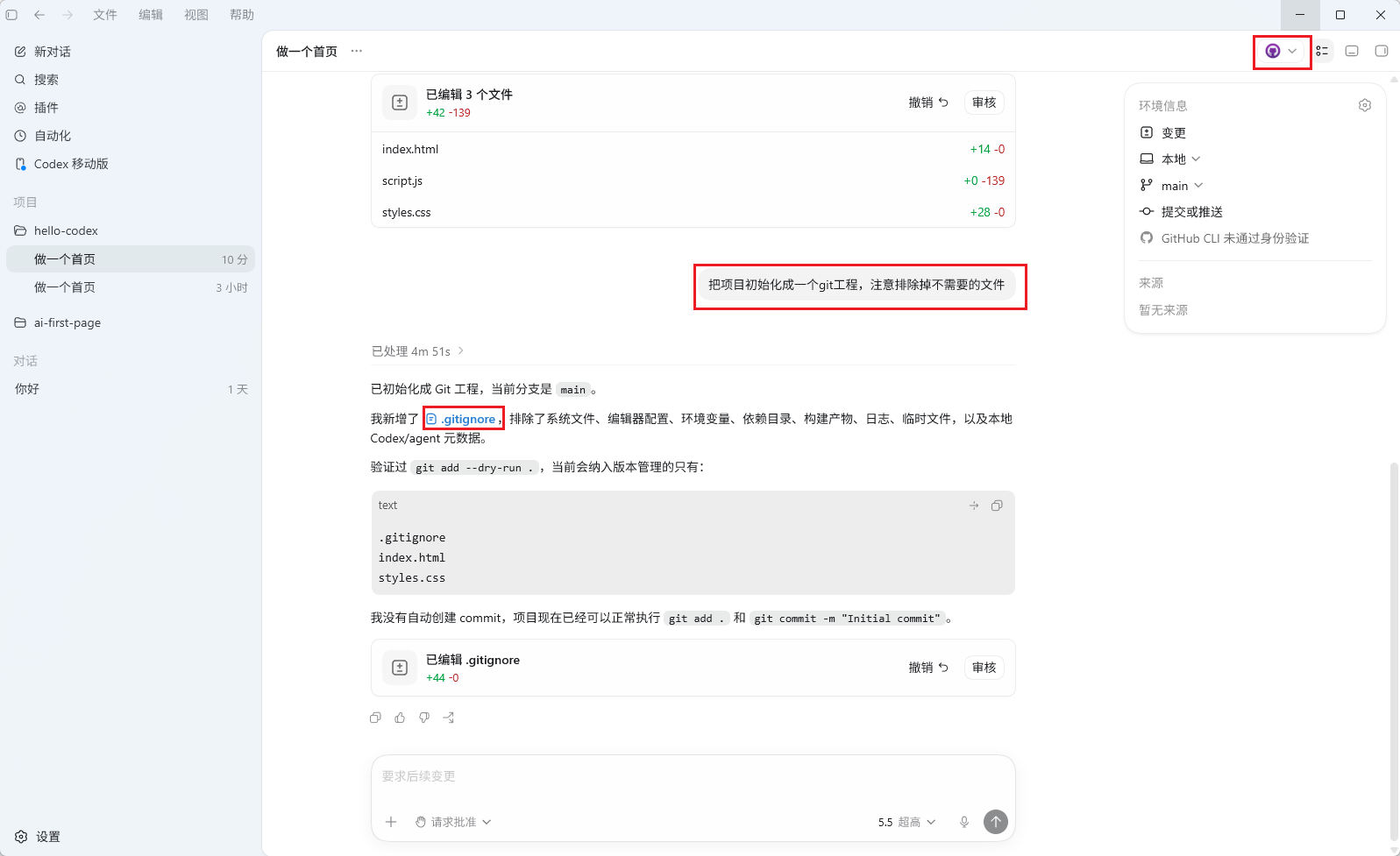
Initialize the repository
Run git init at the project root if the project is not already version-controlled.
Create .gitignore
Ask Codex to exclude node_modules, .env and other untracked build or secret files according to the stack.
Save an initial commit
Before editing, inspect what will be staged and save a baseline: git add -A && git commit -m "init".
Create a task branch
For example, git checkout -b feat/add-login keeps a task separate from the main branch.
Implement the task
Describe the outcome and let Codex inspect code, edit and run relevant commands.
Review the diff
Use git diff or the IDE to verify that the change matches your intent.
Validate
Run tests or start the application and reproduce the required behavior. Resolve failures before proceeding.
Commit
Review staged files, then save the change: git add -A && git commit -m "feat: describe the change".
Push
Use git push origin feat/add-login to publish the task branch.
Open a PR
Open a pull request and merge after the required review and checks.
#Before pushing to GitHub
| Requirement | Description |
|---|---|
| Account | Register and authenticate |
| Local Git | Install Git and initialize the project |
| Repository | Create or select the remote repository |
| Authentication | Configure SSH or an appropriate access token |
| .gitignore | Exclude sensitive/unnecessary files |
Give Codex the intended repository URL and explicitly request the push; it can configure the remote and initial push within that scope.
#Roll back code
Find the target version
Use git log --oneline or the IDE history to identify the target commit, for example a3f8c12.
Describe the recovery you want
For example: “Return to commit a3f8c12 while retaining subsequent work as uncommitted changes.” The command depends on whether you want to preserve local changes or shared history.
A hard reset can discard uncommitted changes. Save or stash valuable work before destructive recovery operations.
#Git worktrees: an independent working copy
Switching branches changes a normal checkout's files. A worktree lets the same repository have several independent working directories at once.
#Why use a worktree
| Scenario | Benefit |
|---|---|
| Experiment with Codex | Keep the main directory untouched |
| Parallel tasks | Separate checkout per task |
| Compare approaches | Independent A/B/C directories |
| Discard an experiment | Remove the unneeded checkout after reviewing its state |
| Large refactor | Merge only after validating the isolated change |
#Basic commands
# Create a new branch and checkout next to the main project.
git worktree add -b feat/experiment ../my-project-experiment

# List checkouts.
git worktree list

# After review and merge, remove the worktree and merged branch.
git worktree remove ../my-project-experiment
git branch -d feat/experiment
Typical flow: continue normal work in the main directory, create a worktree for Codex, review its diff, then merge or remove it after checking for valuable uncommitted changes.
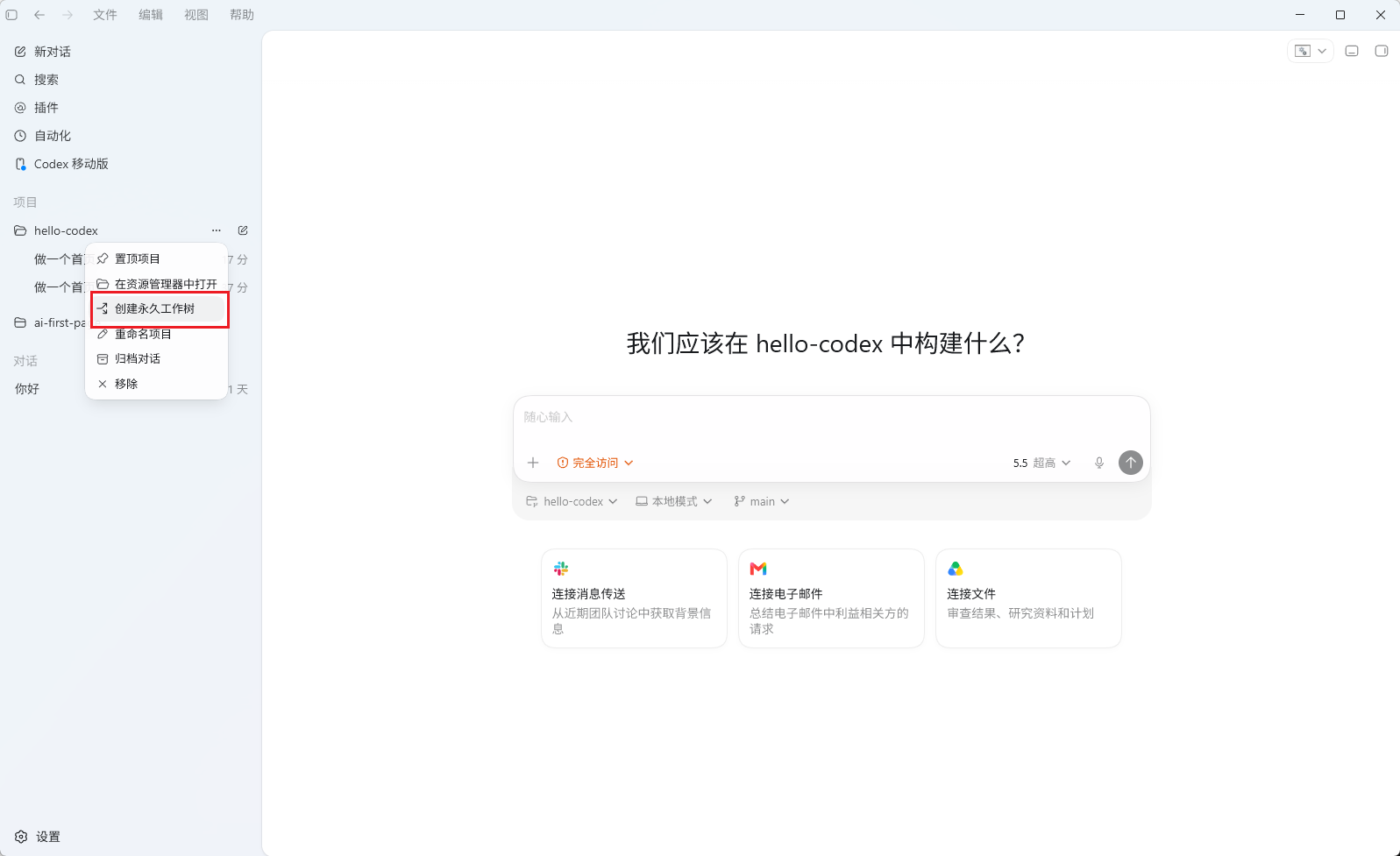
Point Codex at the worktree directory, for example cd ../my-project-experiment && codex "...", or explicitly identify the working directory in the task.
Support
Need help?
For setup, billing, or model issues, email us. Check the status page for uptime.
WeChat / QQ support is available at the bottom right.

